Count-down Kostenzähler|Timer


Count-down   Kostenzähler|Timer
Count-down
Baby Geburt
New Toy
Schwangerschaft Fälligkeitsdatum
Valentinstag
Mothers Day
Verabredung
Anniversary
Geburtstag
Partei
Hochzeit
heimgehen
Urlaub
Ferienhaus
Prüfungen
Alter von 18
Pensionierung
Verlassen
Back to School
Graduation
Ins Ausland
Reisen
Öffnungszeiten
Öffnungszeiten
Besprechung
Konferenz
Konzert
Theater
Wahlen
Meisterschaft
Besuch
Weihnachten
Super Bowl
FIFA
Neujahr
Chinese Neujahr
Neujahr Cards
Wedding Card
Holiday Card
Printing Card
Frühling
Sommer
Herbst
Winter
Kids Song


Kostenzähler|Timer
Liebe
Ich habe dich zu lieben
Ich habe gelebt
Unsere Ehe dauert
Ich habe hier gewesen
Wir haben erreicht

Ferien Countdown Count-down|Kostenzähler|Timer


Count-down|Kostenzähler|Timer Werkzeug!
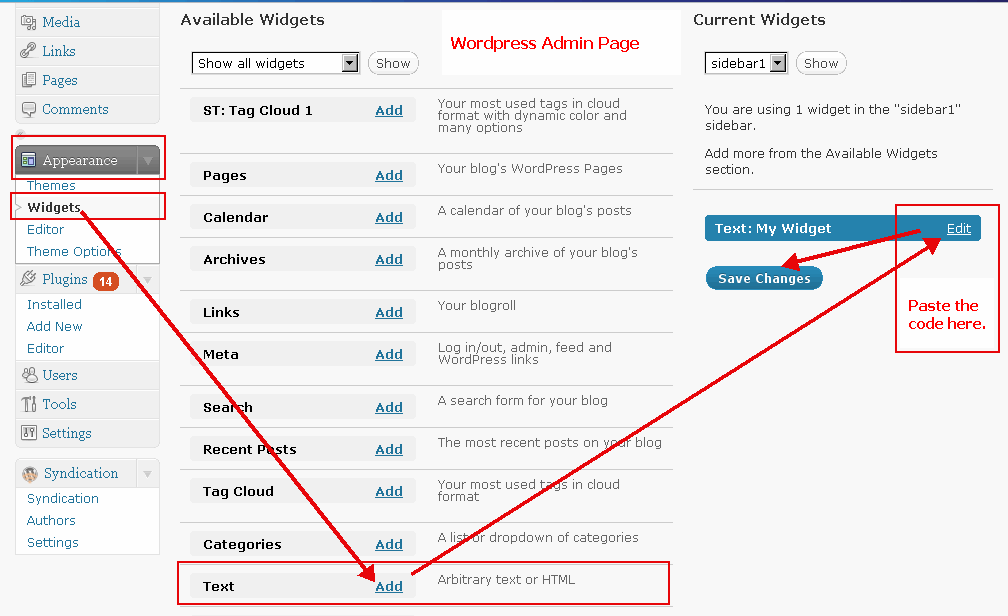
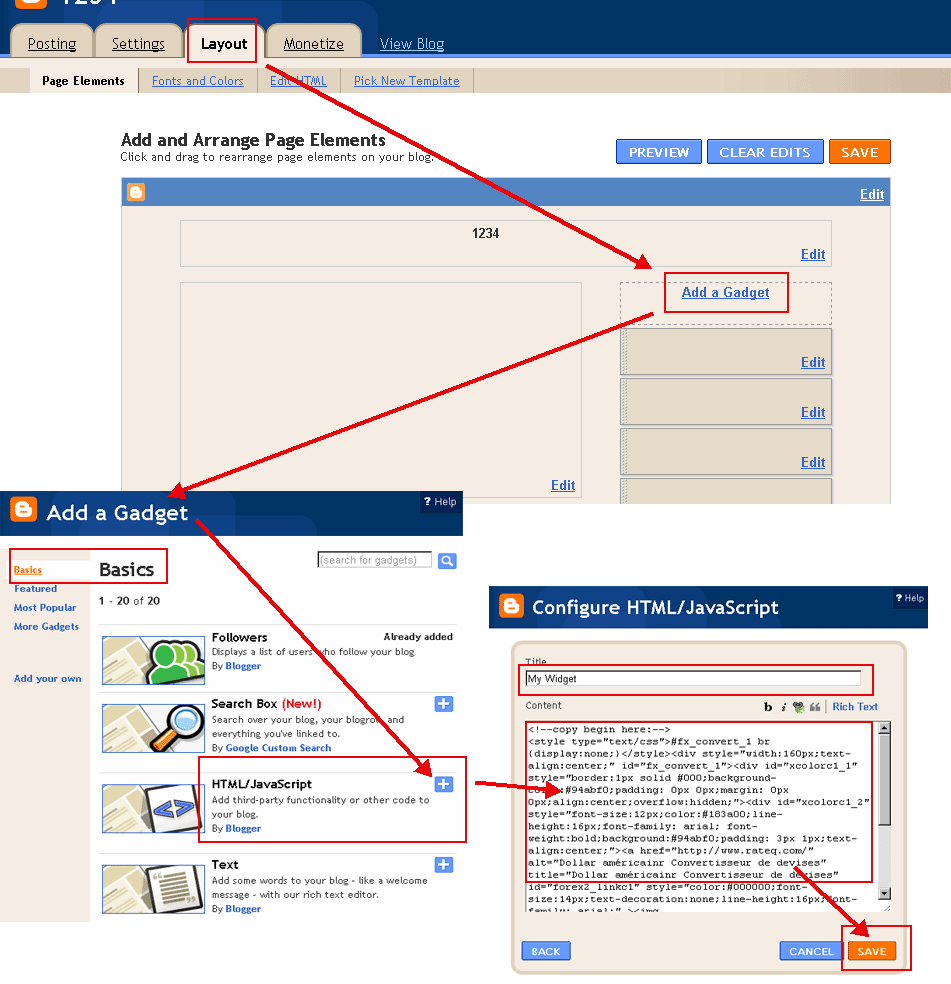
Drücken Sie Kopie-Taste und fügen Sie in Ihrem Blog oder Ihrer Website.
(Wechseln Sie bitte in den 'HTML'-Modus bei der Buchung in Ihrem Blog. Beispiele:
WordPress BeispielBlogger Beispiel)

Datum (Jahr-Monat-Tag):
Text:
Farbe auswählen(?):
Schriftfarbe(?):


Count-down|Kostenzähler|Timer Werkzeug:


Urlaub Informationen & News:
  • How to Open Windows Security in Windows 10 | Tutorials
    How to Open Windows Defender dashboard app in Windows 10 Information Microsoft is making it easier for you to view and control Windows 10
  • Enable or Disable Windows Security in Windows 10 | Tutorials
    The Windows Security app uses the Windows Security Service (SecurityHealthService or Windows Security Health Service), which in turn utilizes the Security Center service (wscsvc) to ensure the app provides the most up-to-date information about the protection status on the endpoint, including protection offered by third-party antivirus products
  • How to Reset Windows Security App in Windows 10 | Tutorials
    01 Nov 2022 How to Reset Windows Security App in Windows 10 Windows 10 includes Windows Security, which provides the latest antivirus protection Your device will be actively protected from the moment you start Windows 10 Windows Security continually scans for malware (malicious software), viruses, and security threats
  • Windows Security is Not Working - Windows 10 Forums
    To reset the Windows Security app using PowerShell, open PowerShell as an administrator and run: Get-AppxPackage Microsoft SecHealthUI -AllUsers | Reset-AppxPackage
  • Virus and Threat Protection Missing - Windows 10 Forums
    The "Virus and Threat Protection" option missing from the Windows Security pane is often caused by a corrupt Windows Security app, registry policies, or a third-party antivirus disabling it
  • How to Create a Windows Security Shortcut in Windows 10
    01 Nov 2022 How to Create a Windows Security Shortcut in Windows 10 Windows 10 includes Windows Security, which provides the latest antivirus protection Your device will be actively protected from the moment you start Windows 10 Windows Security continually scans for malware (malicious software), viruses, and security threats
  • Add or Remove Allowed Apps for Controlled Folder Access in Windows 10
    Allow a blocked app in Windows Security | Microsoft Support This tutorial will show you how to add and remove if specific apps are allowed through the Controlled folder access feature of Windows Defender Exploit Guard in Windows 10 You must be signed in as an administrator to add or remove an allowed app through Controlled folder access
  • Hide App and Browser Control in Windows Security in Windows 10
    Hide or Show App and Browser Control in Windows Security in Windows 10 Windows 10 version 1703 and later provides the latest antivirus protection with Windows Security, which contains Microsoft Defender Antivirus
  • Add or Remove Allowed Apps through Windows Firewall in Windows 10
    How to Add or Remove Allowed Apps through Windows Defender Firewall in Windows 10 Starting with Windows 10 build 16193, Windows Firewall has been renamed to Windows Defender Firewall Windows Defender Firewall can help prevent hackers or malicious software from gaining access to your PC through the Internet or a network Sometimes you may need to allow an app through Windows Dfender Firewall
  • View Protection History of Microsoft Defender Antivirus in Windows 10
    The Protection History page in the Windows Security app is where you can go to view actions that Microsoft Defender Antivirus has taken on your behalf, Potentially Unwanted Apps that have been removed, or key services that are turned off


Count-down|Kostenzähler|Timer ©2005-2009
| |Currency Exchange Rate |Wechselkurse, Währungsrechner